Pay online · 2 MIN READ
Set up WiPay
Availability: Online customer payments are switched off for launch. The screens below use fictional development data. Gateway setup and invoice collection must pass sandbox verification before a business goes live. PowerTranz and Fygaro remain gated while their approved hosted-test setup is obtained.
Get the business’s credentials
- Use the business’s own verified WiPay account. In its profile menu, open Developer and register the requesting website as directed by WiPay.
- Collect Account number: __________ and API key: __________. Enter them only in the admin business gateway form.
- For Sandbox / test, WiPay publishes account 1234567890 and test API key 123. These are shared provider test values, not live merchant credentials.
- Select WiPay, save the sandbox values and use Run sandbox test. Use only the test cards specified by WiPay; never a real customer card.
- Return and refresh. Automatic confirmation checks the callback hash, saved checkout transaction, invoice reference, currency and original amount. If WiPay did not return a checkout transaction reference, finance must reconcile against its dashboard.
- After the test is confirmed, switch to Live account and enter the verified business’s live values. Do not use the shared test values for live invoices.
The current adapter uses Trinidad TTD hosted checkout. Its request includes the callback URL automatically. The invoice amount is charged without an undisclosed extra platform fee; gateway processing fees are absorbed by the merchant. Regenerating a WiPay API key invalidates the old key: reconcile outstanding payments before rotating it.
WiPay official integration and sandbox guide
Screen guide
Fictional development examples. Prices, balances and account details are not real transactions.
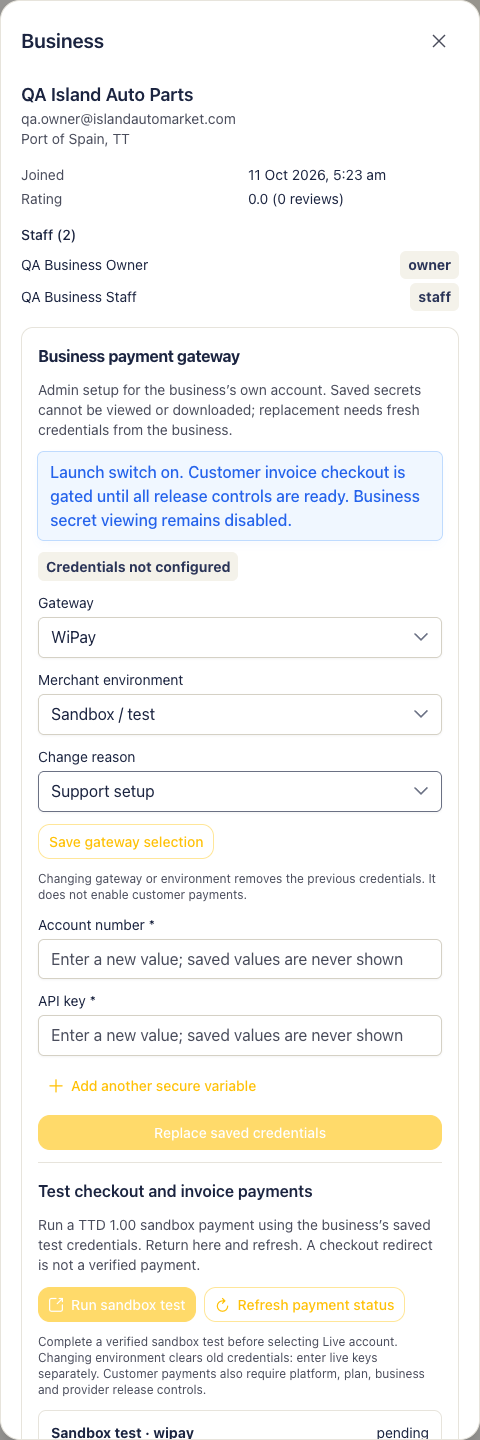
Admin gateway wipay.