Pay online · 2 MIN READ
Prepare Fygaro credentials
Availability: Online customer payments are switched off for launch. The screens below use fictional development data. Gateway setup and invoice collection must pass sandbox verification before a business goes live. PowerTranz and Fygaro remain gated while their approved hosted-test setup is obtained.
Prepare the merchant account
- In Fygaro, open Settings → API Credentials → Generate New.
- API key: __________. API secret: __________. Store the original secret securely when Fygaro displays it; it cannot be recovered later.
- Create a dynamic payment button suitable for the business’s currency. Payment button URL: __________. Signed amount/currency links require the Fygaro plan that supports JWT integration.
- Select Fygaro in the admin business profile and save the named secure variables. The admin cannot retrieve saved secrets.
- Ask Fygaro for the approved sandbox button and merchant integration details. The app does not treat an ordinary live payment button as a sandbox just because the admin selector says test.
- Technical staff finish the hosted-test adapter and signed-hook confirmation before enabling Run sandbox test or live invoice collection.
For a released integration, Fygaro’s default hook credential and the button’s Hook URL must be configured; the signature, timestamp, reference, amount and currency must be verified server-side. This provider is currently preparation-only. Do not paste its button URL into chat or send customers an unverified link as an Island Auto Market invoice.
Fygaro API credentials and signed links; signed payment hooks.
Screen guide
Fictional development examples. Prices, balances and account details are not real transactions.
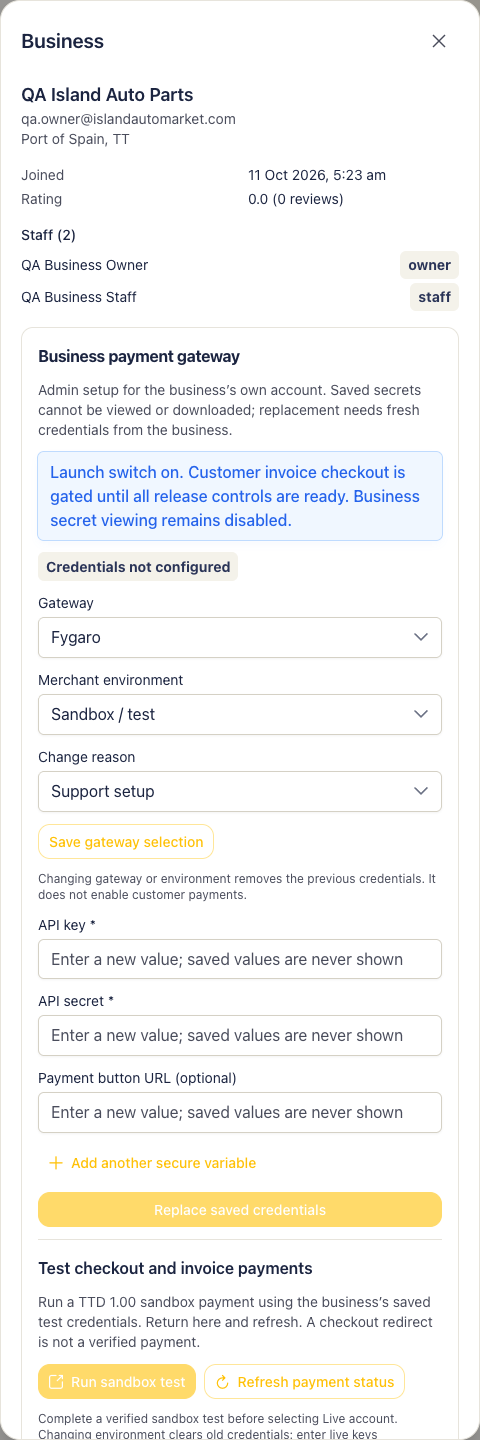
Admin gateway fygaro.