Pay online · 2 MIN READ
Set up HandyPay
Availability: Online customer payments are switched off for launch. The screens below use fictional development data. Gateway setup and invoice collection must pass sandbox verification before a business goes live. PowerTranz and Fygaro remain gated while their approved hosted-test setup is obtained.
Get the business’s API and webhook credentials
- Generate an API key in the business’s HandyPay Merchant Portal. Test keys start hp_test_; live keys start hp_live_.
- Select HandyPay and Sandbox / test in the admin business profile. API key: __________.
- Create an HTTPS webhook endpoint in the same merchant account and key mode. Copy the business-specific Merchant webhook URL shown in the admin gateway setup. Subscribe to checkout.session.completed and checkout.session.async_payment_succeeded. Test and live endpoints are separate in HandyPay.
- Webhook signing secret: __________. It belongs to this endpoint. Enter it with the API key in the encrypted admin form; never reuse another endpoint’s secret.
- Run the sandbox checkout with HandyPay’s published test cards. Return and refresh. A signed event and a same-merchant session lookup must match the payment reference, currency and exact invoice amount.
- After a confirmed test, switch to Live account. Create the live webhook endpoint and enter its fresh live API key and signing secret. Confirm the merchant supports the invoice currency.
All API calls use the business’s saved key on the server. Browser returns never mark a HandyPay invoice paid. Provider fees are absorbed by the merchant for this invoice flow. Wallet top-ups use separate platform configuration.
HandyPay official API and webhook setup; sandbox test instructions.
Screenshot URL: The example was captured in local development. A localhost or 127.0.0.1 address cannot receive HandyPay events. For staging or live setup, use the business-specific HTTPS URL from the deployed admin dashboard.
Screen guide
Fictional development examples. Prices, balances and account details are not real transactions.
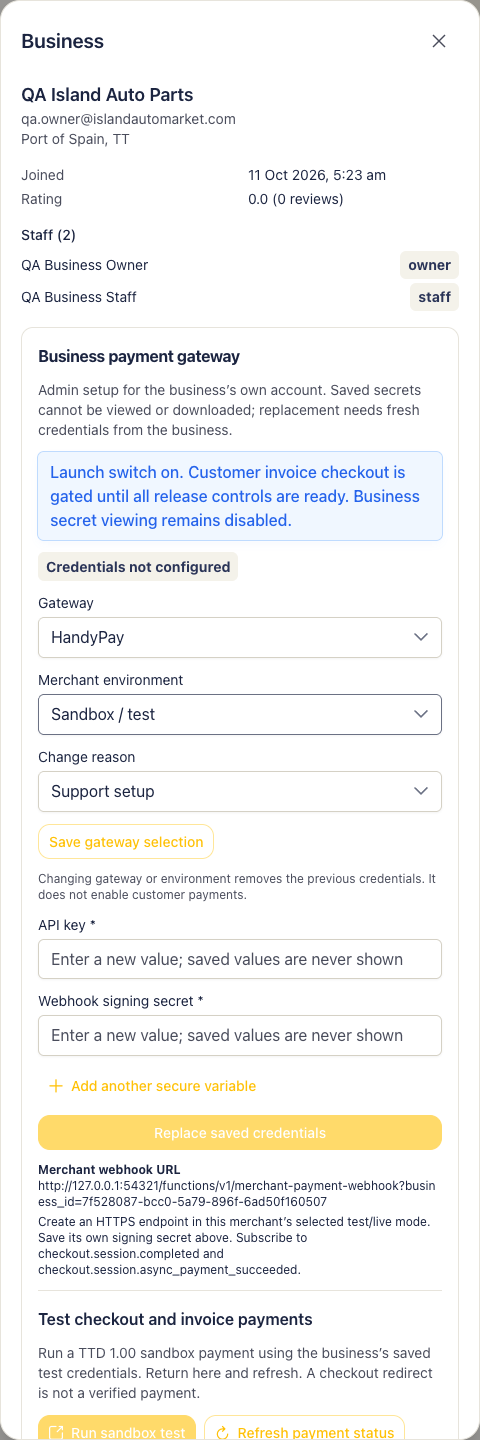
Admin gateway handypay.