Pay online · 2 MIN READ
Prepare PowerTranz credentials
Availability: Online customer payments are switched off for launch. The screens below use fictional development data. Gateway setup and invoice collection must pass sandbox verification before a business goes live. PowerTranz and Fygaro remain gated while their approved hosted-test setup is obtained.
Obtain hosted-checkout onboarding
- Ask the business’s PowerTranz onboarding contact for its hosted payment page (HPP) / SPI integration guide and approved sandbox account.
- PowerTranz ID: __________. PowerTranz password: __________. Enter the test values in the admin form with Sandbox / test selected.
- Obtain the merchant-specific Hosted Page PageSet: __________, PageName: __________ and any supplied Gateway key: __________. Additional named secure variables can be saved without showing their values later.
- Have technical staff verify the approved request URL, redirect flow, final capture confirmation, currency, cancellation and duplicate callbacks.
- Release the hosted-test adapter, run its sandbox test and verify a captured payment before selecting Live account and entering live values.
PowerTranz remains preparation-only while this merchant-specific hosted setup is pending. The WooCommerce examples supplied for review use direct card collection; they are not a substitute for the app’s hosted-checkout configuration. The app and admin must not collect PAN or CVV.
PowerTranz developer onboarding
Screen guide
Fictional development examples. Prices, balances and account details are not real transactions.
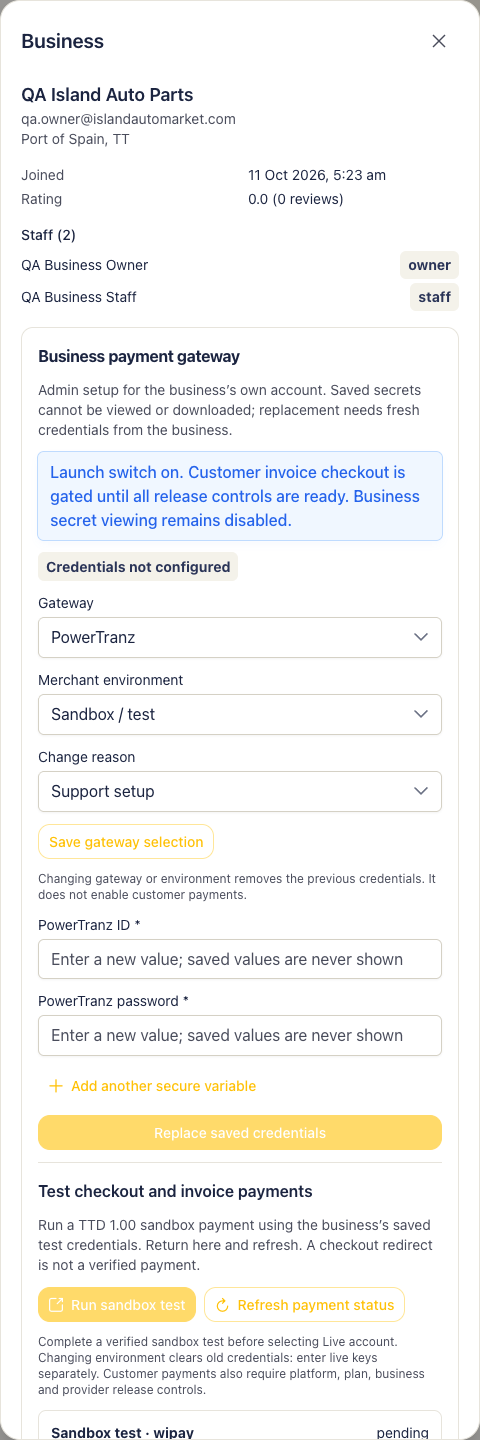
Admin gateway powertranz.